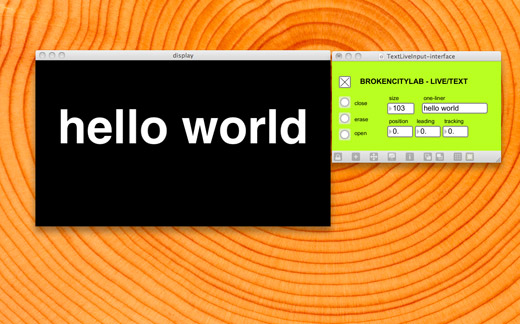
A few hours before we were set to do the 100 Ways to Save the City project, we decided we wanted to make it interactive in some way. I had gone ahead and put all of our ideas on how we might suggest saving the city into a nice Keynote presentation that we could easily play and have that project, but it really limited what the projection could be.
When it came down to actually figuring out how exactly to do this though, we were a bit unsure. There was nothing that I could think of that would do this fairly simple thing we wanted: input controls for basically just text on the laptop screen, and then displaying the resulting text on the projector. So, I went searching through old project files from Quartz Composer, Processing, and Max/MSP/Jitter.
It’s been a while since I’ve worked in any of those programs, and so I was a bit rusty. I knew that I had seen something like this before, and it seemed to me that somewhere I had already hacked together the exact thing we needed. I found the Max patch that detected the dominant colour in a video signal and then overlayed the word on the video (for example, Red), dynamically resizing the text depending on the intensity of that colour, which seemed hopeful, but ultimately didn’t have any manual input.
Finally, I found what I was looking for. It was based on a tutorial on Cycling74‘s website, meant to be dynamic subtitling or something like that. I downloaded the tutorial, changed what I needed and it worked for our performance. Since then, I’ve cleaned it up, got rid of the live video part we didn’t need and simplified the functionality. This was probably the first time that I was in a situation that proved Max/MSP/Jitter’s strengths—quick prototyping, troubleshooting, finessing that ca quickly lead to performance. If you have Max 5, you can download the patch, I’m not sure if it works with 4.6.
This might come in handy this week, depending on what we take on in Peterborough.
Very, very clean. We will need this for our future of projections.
So.. if you’d projected images etc.. it would have looked rubbish? What kind of projector did you use to project on buildings? What’s a DIY method??!!